KiwiSDR :: AI Filtering Using RM Noise
Pretext
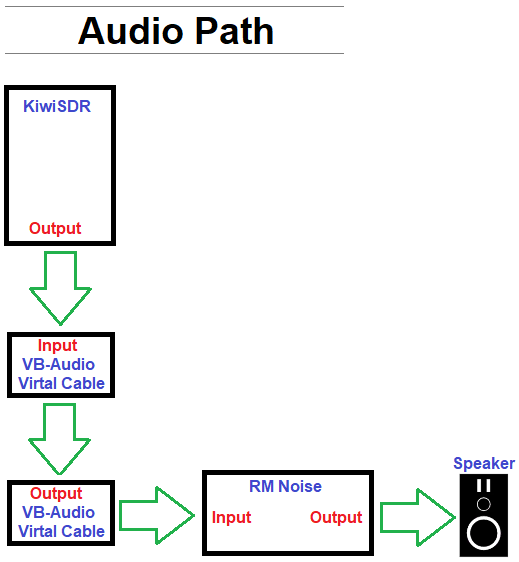
RM Noise is an AI noise removal client that has historically been used to significantly clean up audio from standard HF rigs. However, it can also be used with KiwiSDR, or any online SDR for that matter, by rerouting the audio output in Windows. If you're curious, here is how it works.
Prerequisites
- Windows 10 or Windows 11
- Internet connection
- RM Noise Client
- VB-Audio Virtual Cable
Procedure
1.) Set up a free account on RM Noise.
2.) Download and Install the RM Noise client.
3.) Download and Install VB-CABLE Virtual Audio Device.
4.) Reboot Windows.
5.) Windows Start > type: mmsys.cpl, then press Enter to open the "Sound" window.
6.) Playback Tab > Right-click CABLE Input > Select Set as Default Device.
7.) Open your SDR or find one here, then tune to a QSO.
8.) Setup RM Noise Client, then click Activate Settings:
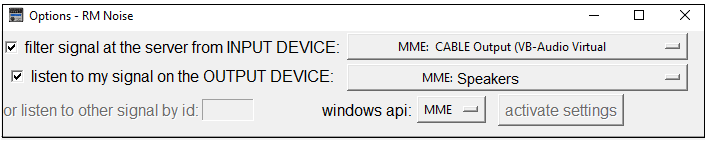
9.) Choose a profile and adjust the settings as desired.
Here is a visual representation of RM Noise applying filtering on your PC using Artificial Intelligence: